Showing posts with label Aweber. Show all posts

Friday, 18 March 2016

Track Downloads With Email Analytics
Track Downloads With Email Analytics

Track Downloads With Email AnalyticsYou may already know about our Email Analytics features. These powerful tools allow you to target your list with pinpoint accuracy, sending messages that respond to subscriber activity.
Anywhere you install our analytics, you can track which of your subscribers visit that page. You can send email newsletters to subscribers who visit your order page, or who look at a specific page or product on your website.
We’ve recently taken things a step further, allowing you to track subscribers who click download links on your site.

How Does It Work?


Any download link on your website can be modified to track subscribers that use it. I came across this post on Chris Brogan’s blog, and I thought to myself that this would be a perfect place to start tracking downloads.

This kind of page, with a free download, is the perfect place to implement download tracking. We could easily follow up with subscribers who downloaded the PDF, asking for feedback on the content in the download, or even linking to related products.
Let’s take a look at the HTML for that download link as it is now:

In order for the link to tell the AWeber analytics javascript that a subscriber has downloaded the PDF, we just add a line or two:

And that’s it – when a subscriber clicks that link, it will be tracked as a page hit to the download!

What Is It For?

Now that we are tracking which subscribers are downloading the PDF, its time to put that information to work. We can now segment our list and send a message to those people.
To do so, we’ll first search our list for hits to the download’s URL – this is in our AWeber account, under the Subscribers tab, Search.
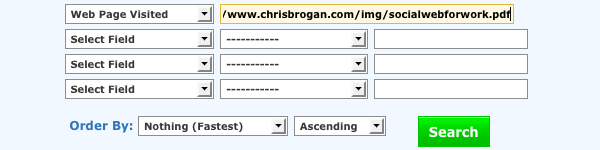
Next, we save this search as a segment so that we can refer to it later:

Now we can create a broadcast and send it out to that segment, directing their attention back to our site with links to similar resources, or maybe just asking for input on the content of the PDF.

How Do I Get Started?

You can take a look at our knowledge base article for more detail on the process – for a more “plug and play” experience, you can just copy and paste this code:
Simply replace the “example.com” URL in BOTH places with the URL of your download, place this link on a page that has your AWeber analytics installed, and you’ll be good to go!


Publish Full Posts In Blog Broadcasts

Publish Full Posts In Blog Broadcasts


Many businesses and bloggers use AWeber’s blog newsletter tool to convert RSS to email and tell readers about new posts on their blogs.
When we released this tool, our thinking was that it would be a way for you to get email subscribers back to your blog in order to read your post, comment on it and take any other actions you wanted after getting to your site. So we designed the broadcasts to include partial blog posts rather than full posts.
While this has worked beautifully for many of you, some of you have asked us to provide a way for you to include full posts directly in the emails.
Now, you can. Here’s how:

Use The {!rss_item_content} Tag

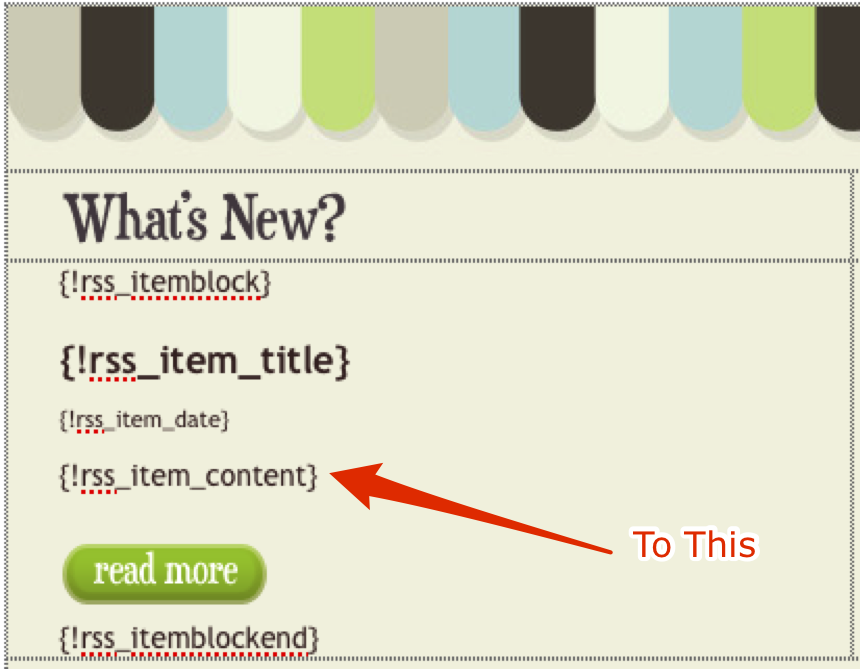
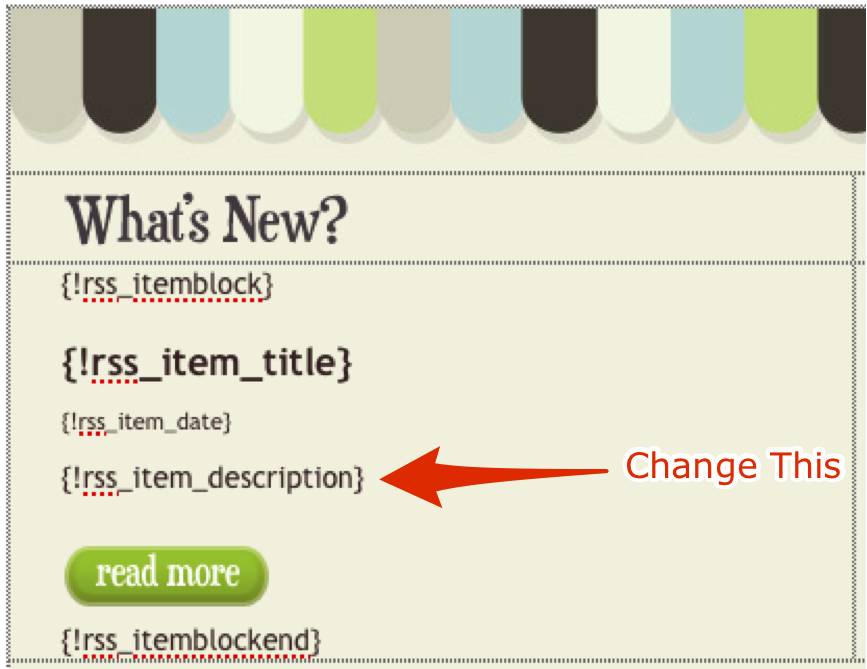
While editing your blog broadcast template, if you want to include full posts rather than partial posts, simply replace the {!rss_item_description} tag with {!rss_item_content}.
Edit RSS Item Description
Enter the RSS Item Content Tag
{!rss_item_content} will merge the full HTML and images from your posts into your blog newsletter.

Do You Prefer Full or Partial Posts In Your Blog Newsletter?

With this available, will you send full posts in your blog newsletters? Or will you send partial posts?
What about as a recipient? Are full or partial posts better for you?

See What Your Forms Could Look Like!

See What Your Forms Could Look Like!


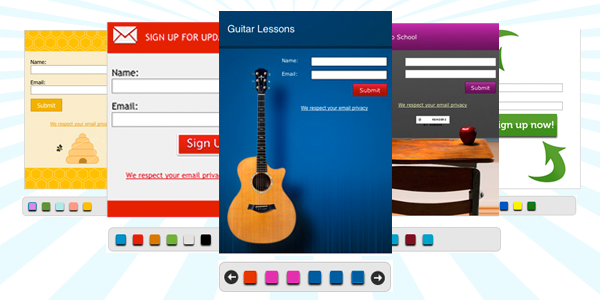
Have you ever wanted to show someone all the cool things you can do with AWeberbefore they purchase an account? Ever wanted to see your options for web formcreation at a glance?

Now you can view all the possible templates and color schemes for web forms in one place with this snazzy, searchable web form template gallery.
Enjoy! And, if you have a moment, tell us what you think of the templates and the gallery!

Want to Learn More About Web Forms?


CLICK HERE !!!
If you’re not familiar with our web form generator, our features page has a great overview of creating beautiful custom forms for your website.
Customizing your web form is easier than ever with our web form generator: take a look at our Knowledge Base or attend our free Better Web Forms webinar for more information!
Finally, skip right to the web form template gallery if you just want to check out the cool templates our design team has put together:

CLICK HERE !!!

New QuickStats for Email Newsletters

New QuickStats for Email Newsletters

QuickStatsIf you’re like most people reading this blog, you love data. Not this Data, but the kind that paints a picture of what is and isn’t working in your email marketing.
The trouble with data, of course, is that sometimes it’s hard to know which data is important and worth focusing on. Not to mention that for it to be valuable, the data has to be actionable, too.
Last week we leaked some information about a soon-to-be-released tool that not only helps you see how your email marketing campaigns perform, but also makes it easy to take action to increase your response rates and conversions.
And now, it’s here.

Announcing Broadcast QuickStats


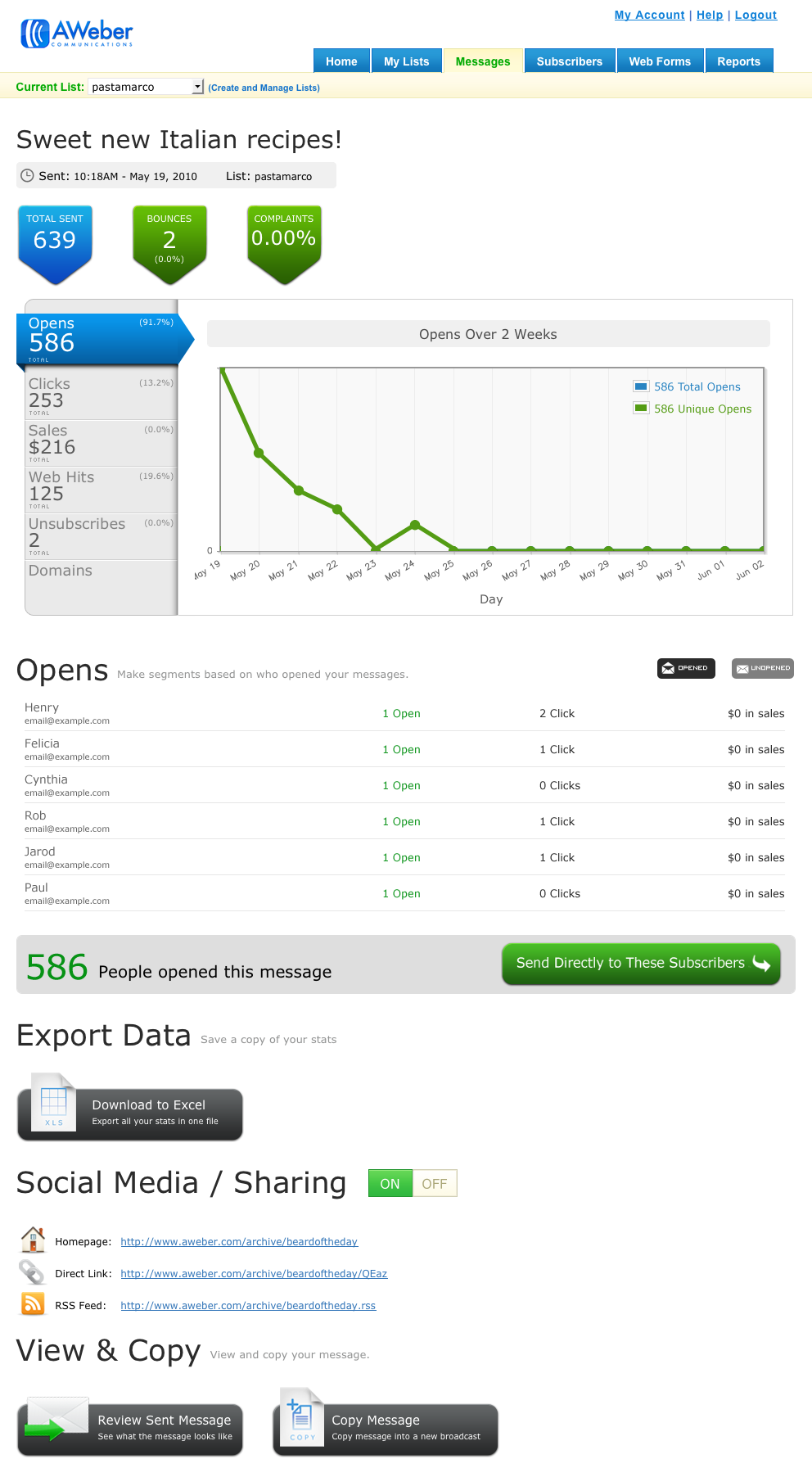
QuickStats makes it easy to understand how your broadcasts performed by showing you:
  • Opens
  • Clicks
  • Web Hits/Traffic
  • Unsubscribes
Some screenshots of QuickStats (click to see full-size images):
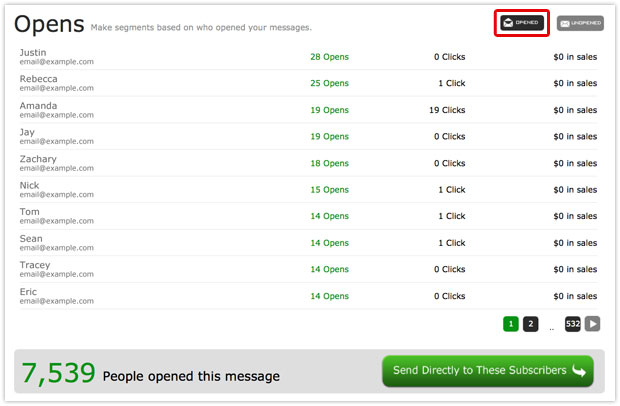
opens-mock
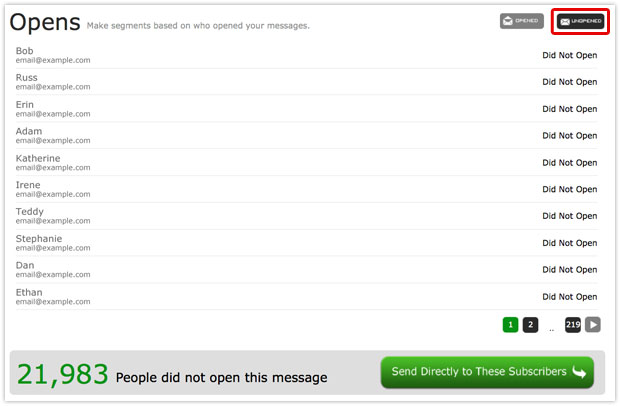
clicks-mock
Even better, you can use the data to identify responsive and non-responsive groups of subscribers – those people who:
  • Opened the email
  • Didn’t open it
  • Clicked a given link
  • Didn’t click that link
  • Made a purchase (did you know that you can track email-driven sales in AWeber?)

Not Only Are QuickStats Useful and Easy-to-Read… They’re Actionable, Too!

This is by far my favorite part.
One of the most powerful things you can do when you know who clicked a link, or didn’t open an email, is segment out those subscribers and broadcast only to them:
Send Directly to These Subscribers
Click to see full-size image
It’s an effective way to talk to people who are interested in a particular product, feature, part of your website or anything else you’re linking to.
Plus, when you’re able to identify who didn’t open or click, and then email only those people, you can:
  • Make an alternate offer
  • Find out what their objections are
  • Send other targeted and relevant email campaigns to increase your conversions

What Do You Think?

How will being able to see at a glance how your broadcasts perform, identify potentially profitable subscriber segments, and quickly and easily create and deliver targeted campaigns to them affect your business?
We’d love to hear how you’ll use QuickStats to increase your response rates and conversions – tell us below!

Why Email Marketers Heart AWeber (& You Will Too)

Why Email Marketers Heart AWeber (& You Will Too)

CLICK HERE !!!
Recently we asked users to submit videos of how they use AWeber to run their email marketing campaigns.
The response was extraordinary. There were videos for just about every industry imaginable, from non-profits to e-courses and everything in between.
We decided to edit a few together into a video showcasing the unique personalities of our amazing customers.

Thanks To All Our Wonderful Users!


You guys are the reason I get off the couch in the morning and come in to work.
Check out the full list of contributions below:

Do Your Words Scare People Away?

Do Your Words Scare People Away?

“Words mean nothing. Action is the only thing. Doing. That’s the only thing.”
– Ernest Gaines


You write words in your marketing emails. Many or few, you use them to communicate your ideas.
But you don’t write words to communicate alone. You write them to request an action. Sometimes it’s subscribing, responding, purchasing – whatever you want readers to do.
The words that carry most of the weight of the request are the few at the end, where you normally provide a link to proceed: your call to action. This is the decision point. The words you use here could sway readers either way.
So how can you know which ones to use? You can guess, based on your own preferences. Or you can know for sure by running a split test.

A Case of Textual Turn-Off


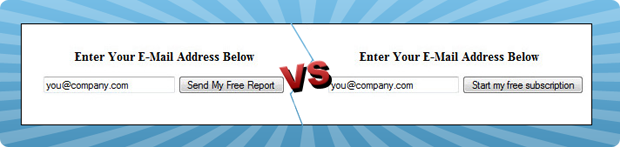
The Cabot Heritage Corporation, a stock advisory, ran a split test on two opt-in buttons. The buttons were identical in design and location. The difference was in the wording: one read “Send My Free Report”; the other, “Start My Free Subscription.”
Split Testing CTA Opt-in Text
Just two words changed, but that change had a powerful effect. The “subscription” button decreased conversions by 22.9% in the span of just two days.

What Happened Here?


Different words trigger different associations, and those can make or break the response.
In the above case, it looks like readers associated “send my report” with a single contact and “subscription” with regular communication, requiring more commitment.
But your readers’ responses will partly depend on your subject and the relationship you already have. The phrase that crashed and burned for Cabot Heritage might take your opt-in rate soaring.
That’s why you need to test for yourself. But when you do, don’t forget to…

Think About the Long Run


In Cabot Heritage’s test, it looks like people preferred the idea of one mailing to regular updates. But whichever button they pushed, they were added to the same mailing list.
It would be interesting to see how people who didn’t expect regular mailings reacted when they started getting them. Did the unsubscribe and spam report rates go up with the opt-in rate?
When choosing the words you want to test, keep in mind that you need to set correct expectations. A well-informed subscriber is a happy subscriber.

How To Test Your Call to Action


Your first step is to write several options that set those expectations and fit the usual “voice” of your brand – how you usually represent your brand in writing.
There are several approaches you could take:
Subscribe Here
You could go with a simple directive.
Sign me up
You could put words in the subscriber’s mouth.
Sign up for a monthly newsletter and a free T-shirt
You could restate the benefits that the subscriber will get.
Once you’ve designed a few options, split test them against each other. (If you use AWeber, here’s how to test your web forms and your broadcasts.) Soon you’ll know just what phrase calls your audience to action best.

Who Answers When You Call?


Are you getting the response you want from your calls to action? Are the subscribers you collect interested and engaged? Do they click and purchase?
Have you split test your call to action in the past? How could you test it now for an even better response?
Share your thoughts below!

How to Open the Door to a Second Wave of Sales

How to Open the Door to a Second Wave of Sales

 width=Click. Creeeaaak!

That’s the sound of a subscriber opening your last marketing email – and opening a mental door to more information on that particular subject.
Then there’s that other sound: the silence. That’s a subscriber who didn’t open their door this time.
In one scenario, you got to share some information. In the other, you didn’t. But in both, you’re still standing on the doorstep. So what to do next?

Make the Most of Your Doorstep Status


In either case, if you shrug and walk away, you’ve given up. Stick around and follow up. Sending a second email based on who opened and who didn’t can prompt a second wave of purchases.
This is called behavioral targeting: responding to subscribers’ behavior to get more response from the list and promotions you already have in place. It’s so effective, 71% of our customers report that they plan to do more of it in upcoming months.
And it’s easy as 1-2-3 clicks. AWeber’s new QuickStats show you just who did and didn’t open each email. Follow up with each group with the steps outlined here.

Don’t Just Stand There – Go In!


Your marketing emails probably cover a myriad of topics. For example, if you own a restaurant, you might promote your menu, your wine selection and your catering service.
When you see people consistently open messages about one of these things, you’ve found your niche for that particular topic. Follow up with them!
Opens shown in QuickStats
  • If they’ve shown interest in a product you’re advertising, put together a compelling reason to purchase with a call to take the next step.
  • If they usually open the emails you send about a particular topic, go more in-depth. Provide helpful details, tell background stories.
  • Explain where you hope to take things, and ask questions. These are your interested customers. These are the people who know most about the topic and will have the most helpful feedback to give.

How to Knock at the Unopened Doors


Sometimes, it’s not anything you did. Your readers are swamped with work or on vacation or their lives have changed and they’re no longer interested.
And sometimes they just aren’t gripped by what they see in the inbox.
Unopens shown in QuickStats
So try again. Let a little time go by to make sure you aren’t sending into the same circumstances. Then change the way you present the content and resend it to just the people who didn’t open it.
Here are some suggestions for changing the presentation:
  • If your email is a newsletter that covers several topics, the one your subject line mentioned the first time might not be the most interesting to your readers. Choose a different subject as the primary content and change your subject line accordingly.
  • If your email covers just one topic, try changing the subject line. Think about what problem or question someone might have that your email answers, and highlight that.

If Knocking Doesn’t Work, Ring the Doorbell


You might notice that some of your subscribers haven’t opened a message in a long time. These are fatigued subscribers. They’ve checked out, but they haven’t left the building yet.
Ask them to stay by sending them emails designed for reactivation (get more reactivation ideas here).

Knocking Around the Block


There are also messages you could send to follow up with subscribers who clicked (or didn’t click) on your links and who purchased (or didn’t purchase) from your emails. We’ll be talking about those in the next few weeks, so keep your eyes open!
Do you send messages to subscribers based on whether or not they opened previous emails? What do you send them?

Want to Learn More?

For more information on email marketing for wineries, view our complete Email Marketing for Wineries Guide.

Email Marketing for Wineries

Download Email Marketing for Wineries
Email Marketing for Wineries

Download Email Marketing for Wineries
As a winery owner, your plate (or glass) is pretty full. You have a vineyard to tend, wines to bottle and a tasting room to maintain.

On top of all that, you need to actually promote your winery, and that can take your glass from full to overflowing. So any ad campaign you run had better be worth the time and effort.

Email Marketing Is Worth It
Here’s why.

Email happens online. Your ad isn’t on a billboard or in a magazine, where people have to remember to look you up later. It’s in the inbox, just a click or two away from your web site. Your subscribers can set up a visit or order a shipment in a matter of seconds.

Email also lets you focus your dollars in the most efficient places. Why pay to market to people who don’t drink wine? Email’s opt-in nature means you only advertise to people who are already interested (and therefore, most likely to respond).

And once people have opted in, you can keep up an email conversation endlessly. Once you have someone’s permission, you have endless chances to engage them. And an engaged subscriber often becomes a customer.


CLICK HERE !!!

Finally, email is a conversational medium. When people see your ad and wonder, “But would they mind if I brought my dog?” or “Could 12 of us show up without a reservation?” they can just hit “reply” and ask!

Emails provide potential customers with the information they’re looking for. It can invite your current customers back to visit and buy that favorite bottle again. When your winery may otherwise slip out of mind, email can bring it back.

How Your Winery Can Use Email Marketing
In this free report, you’ll learn:

The online form that can attract subscribers to your marketing emails
7 ways to get people to that form
5 ways to ask people to sign up for your emails in person
Real-life examples from wineries who are already marketing with email
A proven method for a sparkling marketing reputation
10 suggestions for content to put in your emails
A guide to four common email formats, with examples of how wineries use each one
With these strategies, you can send marketing emails that take your winery from a one-time tasting to your subscribers’ house special.


CLICK HERE !!!

Download the PDF Guide
Share This Guide With Others
Does your favorite winery need help with their email marketing? Pass this guide on to them:

 13 11 2 11Google +12 266
Download more email marketing guides.

Ready to Increase Your Winery’s Sales and Profits?
Email continues to bring in more conversions than social media and search. Start building your email list today!

Start Your 30-day Free Trial Now
- See more at: https://blog.aweber.com/guides/email-marketing-for-wineries#sthash.UwUCvg1O.dpuf

Post Your Email Newsletters to Your Facebook Fan Page

Post Your Email Newsletters to Your Facebook Fan Page

Like many businesses, you may be exploring integrating social media with your email marketing campaigns. Doing so can expand the reach of your messages and grow both your fans/followers as well as your email list.
So at AWeber, we’ve made a point of helping you combine email and social media by helping you automatically share your email newsletters on Twitterand Facebook.
As some of you noted when we rolled out our integration with Facebook, it only worked with personal profiles (not fan pages) due to limitations with Facebook’s API. We knew you wanted to post to your fan pages, but it wasn’t technically feasible at the time.
Well, as the saying goes, the only constant is change. And this is a good one. Facebook has changed their API, we’ve changed our integration and you can now post your email newsletters to your fan pages.

How to Share Your Email Newsletters On Your Facebook Fan Page

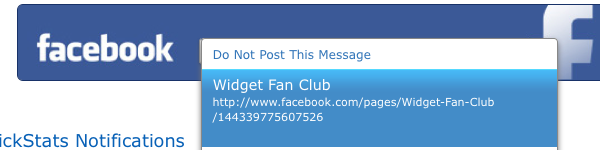
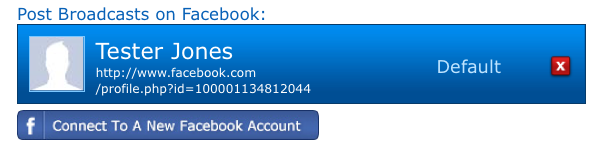
Go to your List Settings page and click the “Connect To A New Facebook Account” button under the Social Media / Sharing header (this works the same way whether you have a Facebook account connected already or not).
Connect to New Account
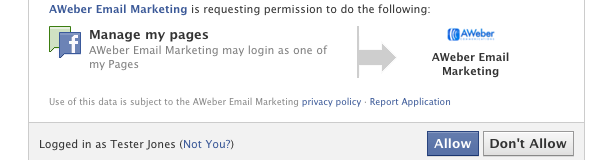
When prompted, allow AWeber Email Marketing to manage your pages.
Allow Access
When you create your broadcast, go to the “Social Media/Sharing” section and choose to share the email on your fan page.
Share Email on Your Facebook Fan Page
That’s all there is to it! Feel free to take a look at our Knowledge Base for more detailed information and instructions on integrating Facebook and AWeber.
Enjoy!

Smart Video Thank You Pages

Smart Video Thank You Pages

Video Thank You PageThe thank you page is the first thing a subscriber experiences after signing up to your email marketing campaign. It does a lot toestablish expectations about your campaign.
It’s also where you can knock their socks off.
An awesome thank you page can get subscribers excited about receiving your emails, making each each and every broadcast you send a celebratory occasion for them. (Or, at the very least, make them more likely to open your emails.)
With the launch of our new Web Form Generator, you can also offer a more personalized thank you page experience to subscribers.
Update: Our interface has changed since this blog post was made. Please consult our knowledge base for up-to-date information.

A Smarter Way To Say Thanks


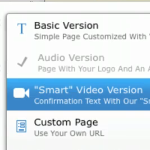
Smart video thank you pages are the happy medium between AWeber’s default thank you page and your own custom URL.
We pass subscriber form data to the page so that everyone who signs up to your list gets a unique experience.
This is your subscriber’s name with your confirmation subject line. Not a generic “Check Your Inbox” message. And it’s as simple as choosing Smart Video Version from the thank you page drop down menu.
Not only that, the smart thank you page will pick out the subscriber’s email provider and adjust the video accordingly.
So if someone enters an address that includes @gmail.com, they’ll see a video telling them to check their Gmail inbox. Likewise with Yahoo, Hotmail and many others.
If we don’t have a specific video available (say, for addresses at personal domains), your subscriber will see a video showing the most popular email application for their operating system (Outlook for Windows, Mail for Mac OS X).
A good looking web form makes a great first impression on a subscriber, but an engaging thank you page is just as important.
You can shape expectations and build anticipation, all the while directing the subscriber to their inbox.
  • It’s important to note that these thank you pages are only available if you’re usingconfirmed opt-in… so if you’re not already doing so, consider this reason number three ba-billion to start.